Give any model a terminal and files
Brian Thomas ·

Introducing the openrouter:shell server tool and the Files API: any model on OpenRouter can now run commands in a hosted Linux container. The Files API enables upload of files for models to work with and the download of outputs. Both are available today in beta.
Shell and Files join our growing list of server tools, enabling you to create server-side agentic behaviors you can swap across models. For example, you can ask any model to search the web, write a script that turns the results into a chart, and run it entirely with server-side compute.
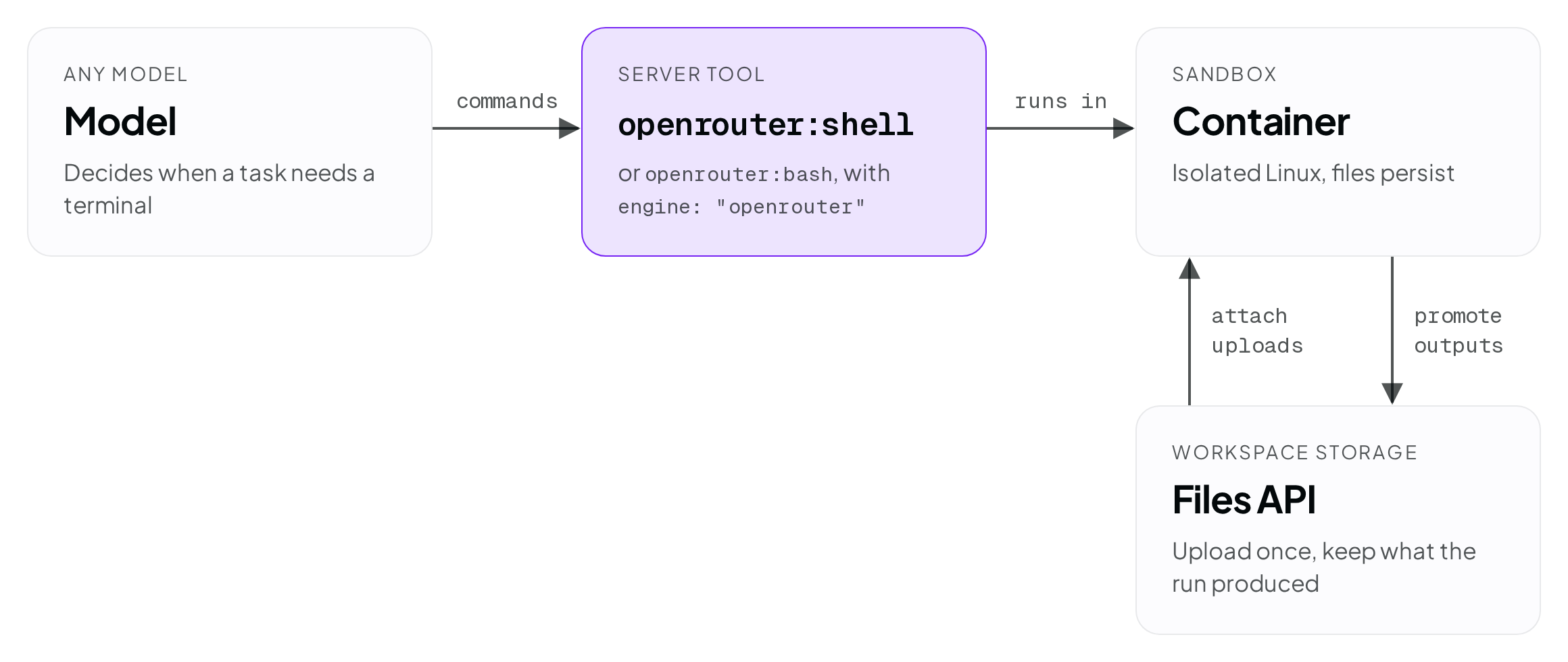
Try it in the chatroom by turning on the shell tool, and read the shell, containers, and Files API guides for the API details. Sandbox time costs $0.0001 per second, is billed as part of the request, and includes Files API usage. Details are in the Pricing section.
How shell works
To use openrouter:shell, send it in the tools array for any model that supports tool calling. This lets the model decide when it needs a terminal and when to invoke it:
curl https://openrouter.ai/api/v1/responses \
  -H "Authorization: Bearer $OPENROUTER_API_KEY" \
  -H "Content-Type: application/json" \
  -d '{
    "model": "deepseek/deepseek-v4-pro-0813",
    "input": "Check the Python version, then write a script that prints the first 20 primes and run it.",
    "tools": [
      { "type": "openrouter:shell", "parameters": { "engine": "openrouter" } }
    ]
  }'
We’ve introduced three capabilities that work together to provide server-side command execution and files:
- Shell and Bash: We support the OpenAI-compatible Shell tool, on the Responses API and the Anthropic Messages API, as well as
openrouter:bash, the Anthropic-compatible Bash tool, on the Messages API. Both work with any model. - Files API: workspace storage under
/api/v1/files. Upload files, attach them to a container by id, and keep the files a run produces. - Containers: these are the sandbox where shell commands run. Files written there persist between requests that share a container id. You can access the container’s contents through the
/api/v1/containersAPI.
When the model calls the tool, it emits a batch of commands. They are executed within the container, each in its own invocation, and return stdout, stderr, and an exit code to the model. This allows the model to react to the output it receives. For example, if it writes a script to parse your CSV and the parse fails, it can see the problem on stderr and fix the script before answering.
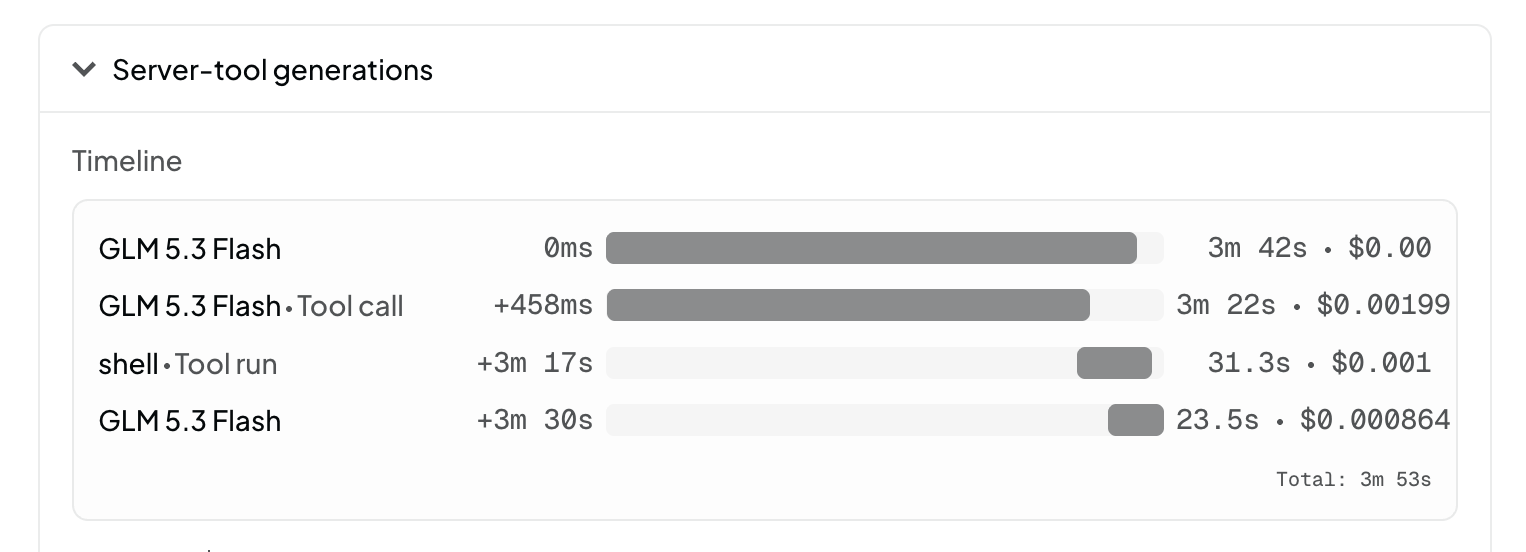
The generation details view on the Logs page shows the request as a timeline. The model turns and the sandbox run appear as separate rows, each with its own duration and cost:
Shell and bash
We shipped two different tools for sandbox command execution to provide compatibility with both the OpenAI and Anthropic spec. The most notable difference is that the bash tool’s default is to ask your app to run the command locally. On OpenRouter, you can change the engine to override this behavior and execute on the server.
openrouter:shell | openrouter:bash | |
|---|---|---|
| Compatible with | OpenAI’s shell tool | Anthropic’s bash tool |
| APIs | Responses, Messages | Messages |
| Runs commands by default | In the OpenRouter sandbox | In your application |
engine: "openrouter" on either tool guarantees server-side execution in the OpenRouter sandbox with any model.
Containers
A container is an isolated Linux environment on OpenRouter’s infrastructure scoped to your workspace. Containers can be configured for the needs of your app:
- Network: outbound access is off by default. For jobs like
pip3 install, setnetwork_policyto an allowlist such as{ "type": "allowlist", "allowed_domains": ["pypi.org", "files.pythonhosted.org"] }, or{ "type": "allowlist", "allowed_domains": ["*"] }for unrestricted egress. Allowlisted hosts are reachable on ports 80 and 443; requests to domains outside the allowlist fail with HTTP 520 rather than a connection error. The policy cannot be changed after the container starts. - Files: only files under the home directory (
/workspace/home) are captured. Each shell result also returns a list of ids for the files a command created or changed (prefixed withcfile_). The container files endpoint lists everything saved in the container, and the Files API is for moving files in and out. - Reuse across requests: by default, a conversation gets a fresh container. If a request includes a
session_idor a previous shell result with an identifiable container, that container is reused. To pick a container explicitly, pass{ "type": "container_reference", "container_id": "my-project" }in the tool’senvironmentfield. - Lifetime: a container sleeps after 5 minutes idle. This is not configurable.
Files and shell together
The Files API is workspace storage that sits alongside the container. You upload inputs there for shell to work on, and you move shell’s outputs back into it.
Upload a file for shell
Upload the input with POST /api/v1/files. The response includes a file id that starts with or_file_:
curl https://openrouter.ai/api/v1/files \
  -H "Authorization: Bearer $OPENROUTER_API_KEY" \
  -F "file=@data/sales.csv"
Then attach it by id in the tool’s environment:
{
  "type": "openrouter:shell",
  "parameters": {
    "engine": "openrouter",
    "environment": {
      "type": "container_auto",
      "file_ids": ["or_file_011CNha8iCJcU1wXNR6q4V8w"]
    }
  }
}
Attached files appear in the home directory as writable copies, up to 20 per container. Each copy is named with the last 8 characters of the file id plus the original filename, so data/sales.csv attached with the id above becomes ~/NR6q4V8w-sales.csv. Changes inside the container won’t affect the original workspace file. A container starts with only the files you attach to it.
Download a file shell generated
Each shell result lists the files the command touched, with a cfile_ id for each. Download the files with the container file content endpoint:
curl "https://openrouter.ai/api/v1/containers/$CONTAINER_ID/files/$FILE_ID/content" \
  -H "Authorization: Bearer $OPENROUTER_API_KEY" \
  -o output.txt
Container files are kept for 30 days. To keep one for the long term, promote it:
curl -X POST "https://openrouter.ai/api/v1/containers/$CONTAINER_ID/files/$FILE_ID/promote" \
  -H "Authorization: Bearer $OPENROUTER_API_KEY"
Promoting copies the container file into your workspace and returns a new or_file_ id, which you can attach to a later run the same way as an upload. Unlike uploads, promoted files are downloadable through the Files API.
Files API details
You can view all of your files on the workspace files page. Files you upload directly cannot be downloaded, but files promoted from a container can.
Using multiple server tools together
Shell is one of many server tools we offer and are powerful when working together. Here the model uses web search to find material and shell to turn it into a file:
curl https://openrouter.ai/api/v1/responses \
  -H "Authorization: Bearer $OPENROUTER_API_KEY" \
  -H "Content-Type: application/json" \
  -d '{
    "model": "deepseek/deepseek-v4-pro-0813",
    "input": "Look up the three biggest open-source AI releases this week, then write ~/out/releases.md with one paragraph each and a source link.",
    "tools": [
      { "type": "openrouter:web_search" },
      { "type": "openrouter:shell", "parameters": { "engine": "openrouter" } }
    ]
  }'
The resulting ~/out/releases.md shows up in the shell result’s file list, and you download it with the container file content endpoint above.
This combination also matters if you don’t want to give the container network access. Web search runs outside the container, so the model can pull in web content and pass it into its commands while the container stays on the default network policy with no internet access of its own.
In the chatroom, the same combination works with the shell and web search switches turned on. Files the run creates appear in the conversation as downloads.
Pricing
Shell and Bash usage is billed by sandbox time. The price is $0.0001 per active second, metered from the moment a request first runs a sandbox command until the last sandbox command. Time a container spends idle after the request ends is not billed.
We bill a minimum of 30 seconds when a request starts a cold container, either a new one or one that has gone idle. If an agent makes several requests to the same container in succession, only the first pays the minimum.
Billing per request makes it easy to find the cost to run a specific request. A request’s cost is its token cost plus its sandbox time, and the sandbox time appears as its own row in the request’s timeline on the Logs page.
Files API usage has no separate charge, but total storage is limited to 10 GiB.
Disabling tools for a workspace
Server tools are enabled by default. A workspace admin can turn any of them off from the workspace’s Server Tools page, where each tool has a switch showing Available or Blocked. The setting applies to every request the workspace makes, whether through API keys, the chatroom, or presets.
Get started
Shell, Bash, the Files API, and containers are in beta and available now. The API may change during the beta. If something doesn’t work the way you expect, let us know in #feedback on our Discord.